If you are involved in transporting goods across states or cities for business, you’ve probably heard the term Eway Bill Login more than once. For many beginners, however, the process can feel confusing at first. Government portals, compliance rules, and tax systems often sound complicated, especially if you are just starting with digital documentation.
The good news is that the Eway Bill Login process is actually quite simple once you understand how the system works. In fact, thousands of businesses generate e-way bills daily without any trouble. With the right guidance, you can log in, generate your e-way bill, and manage transportation documents in just a few minutes.
In this guide, we will walk through everything you need to know about the Eway Bill Login process. From registration to troubleshooting login issues, you’ll learn step-by-step instructions, practical tips, and important details every beginner should know.
What is an E-Way Bill?
Before discussing the Eway Bill Login, it’s important to understand what an e-way bill actually is.
An e-way bill (electronic way bill) is a digital document required for the transportation of goods under the Goods and Services Tax (GST) system. It is generated on an online portal before goods are transported from one place to another when the value exceeds a specific threshold.
This system was introduced to make goods transportation transparent and reduce tax evasion.
Key Features of an E-Way Bill
Some important features include:
-
Generated online through the eway bill portal
-
Required for interstate and intrastate goods transport
-
Includes invoice details, transporter information, and vehicle number
-
Valid for a limited time depending on distance
-
Managed through the GST e-way bill system
Businesses, transporters, and registered GST taxpayers must access the portal through the Eway Bill Login to create or manage these documents.
Why the Eway Bill Login Portal Matters
The Eway Bill Login portal acts as the central platform where users can manage their transportation documents digitally.
Through this portal, users can:
-
Generate a new e-way bill
-
Update vehicle details
-
Cancel or modify existing e-way bills
-
Track the status of goods movement
-
Print e-way bills for transport verification
-
Manage transporter ID information
-
View transaction history
In addition, the portal ensures compliance with GST regulations, making it an essential tool for businesses involved in logistics and supply chain operations.
Who Needs to Use the Eway Bill Login?
Not everyone needs to generate an e-way bill, but certain individuals and businesses must use the Eway Bill Login portal regularly.
The following users typically require access:
-
GST Registered Businesses
-
Transport Companies
-
Warehouse Operators
-
Logistics Providers
-
Suppliers and Distributors
-
E-commerce Sellers
For example, if a manufacturer ships goods worth more than the threshold value, they must log into the portal using their Eway Bill Login credentials and generate the required documentation before dispatching the goods.
Requirements Before Using the Eway Bill Login
Before you attempt the Eway Bill Login, you must ensure you have completed the necessary setup.
Basic Requirements
You will need the following:
-
Valid GSTIN number
-
Registered mobile number
-
Internet connection
-
Business details
-
Transporter details (if applicable)
-
Invoice or bill of supply
-
Vehicle number
In addition, users must register on the e-way bill system portal before they can access the login dashboard.
Step-by-Step Eway Bill Login Process
Now let’s go through the Eway Bill Login process step by step. Beginners can follow these instructions easily.
Step 1: Visit the E-Way Bill Portal
Start by opening the official GST e-way bill portal using your browser. This platform is used by taxpayers, transporters, and businesses for all e-way bill activities.
Once the homepage loads, you will see the Eway Bill Login section on the screen.
Step 2: Enter Your Login Credentials
In the Eway Bill Login form, you will need to enter:
-
Username
-
Password
-
Captcha code
Make sure your details match the credentials created during eway bill registration.
Step 3: Access the Dashboard
After successfully completing the Eway Bill Login, you will be redirected to your dashboard.
The dashboard allows you to:
-
Generate a new e-way bill
-
Update transporter details
-
Print documents
-
Check validity
-
Track shipments
This is the main control panel for managing all e-way bill activities.
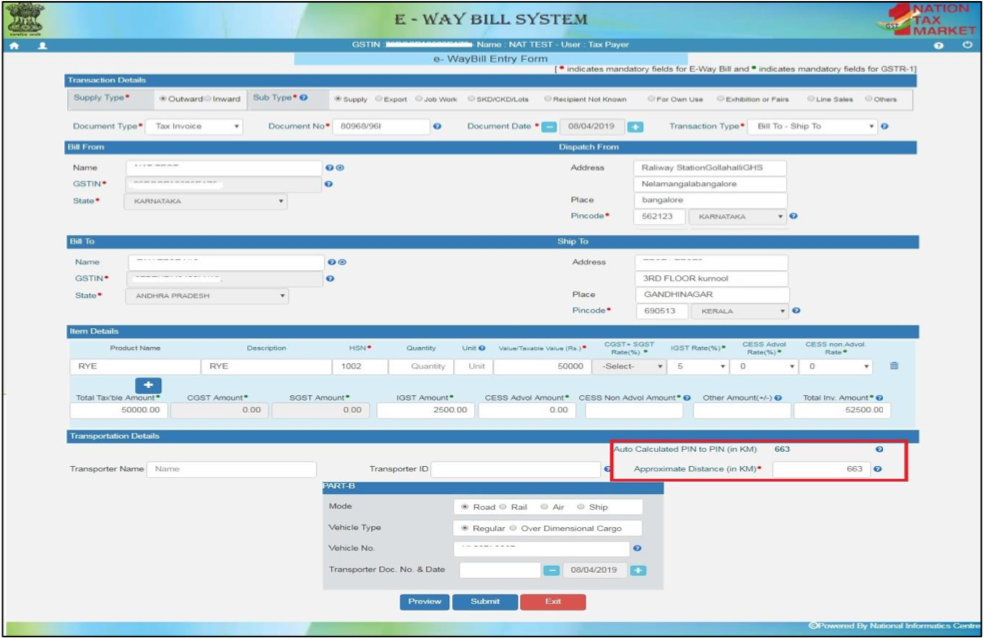
Step 4: Generate a New E-Way Bill
Once logged in, you can generate an e-way bill by selecting the Generate New option.
You will need to enter:
-
Supplier details
-
Recipient information
-
Invoice number
-
Product details
-
HSN code
-
Transport mode
-
Vehicle number
-
Distance of transportation
After submitting the information, the system will generate an E-Way Bill Number (EBN).
Step 5: Download or Print the Bill
After the Eway Bill Login and generation process, you can:
-
Download the document
-
Print it
-
Share it with the transporter
Transport authorities may verify this document during goods transit.
Common Problems with Eway Bill Login
Beginners sometimes face issues during the Eway Bill Login process. Fortunately, most problems are easy to solve.
1. Incorrect Username or Password
This happens when login details are entered incorrectly.
Solution:
Reset your password through the forgot password option.
2. Captcha Error
Captcha verification prevents automated access.
Solution:
Refresh the captcha and enter it carefully.
3. Account Locked
Multiple incorrect login attempts may lock your account.
Solution:
Wait a few minutes or contact portal support.
4. Portal Not Loading
Heavy traffic can sometimes slow down the e-way bill portal login page.
Solution:
Try clearing your browser cache or logging in later.
Tips for Secure Eway Bill Login
Security is extremely important when accessing government portals.
Follow these best practices for a safe Eway Bill Login experience:
-
Use a strong password
-
Avoid sharing login credentials
-
Log out after each session
-
Use a secure internet connection
-
Update passwords regularly
-
Monitor portal activity
These steps help protect sensitive GST and transportation records.
Important Details Included in an E-Way Bill
After completing the Eway Bill Login, the generated document contains several important fields.
Key Information in an E-Way Bill
| Section | Details Included |
|---|---|
| Supplier Details | GSTIN, business name, address |
| Recipient Details | Buyer information |
| Invoice Details | Invoice number and date |
| Goods Information | Product description, HSN code |
| Transport Details | Vehicle number and transporter ID |
| EBN Number | Unique e-way bill number |
Authorities may check these details during transportation inspections.
Validity Period of an E-Way Bill
The validity of an e-way bill depends on the distance goods are transported.
Standard Validity
| Distance | Validity |
|---|---|
| Up to 200 km | 1 day |
| Every additional 200 km | +1 day |
If the validity expires before delivery, users must log in again using the Eway Bill Login portal and extend the validity period.
Advantages of Using the E-Way Bill System
The Eway Bill Login system offers several benefits for businesses and authorities alike.
Major Benefits
-
Faster transportation compliance
-
Reduced paperwork
-
Improved tax transparency
-
Real-time tracking of goods
-
Digital record keeping
-
Easier audit process
-
Lower risk of penalties
Moreover, the system integrates smoothly with GST compliance tools, making it easier for companies to manage logistics.
Frequently Used Features After Eway Bill Login
Once you complete the Eway Bill Login, you can access multiple features that help manage logistics operations.
Popular Portal Features
-
Generate e-way bill
-
Update vehicle number
-
Cancel e-way bill
-
Extend validity
-
Reject e-way bill
-
Create transporter ID
-
Bulk generation
-
Consolidated e-way bill creation
These tools help streamline supply chain documentation for businesses.
Best Practices for Businesses Using E-Way Bills
Businesses that frequently use the Eway Bill Login portal should follow certain best practices.
Recommended Practices
-
Generate e-way bills before dispatching goods
-
Double-check invoice details
-
Update vehicle numbers if transport changes
-
Maintain digital records
-
Train staff on portal usage
-
Monitor bill validity regularly
These steps help avoid GST compliance issues and prevent unnecessary fines.
Frequently Asked Questions
Is Eway Bill Login mandatory?
Yes, businesses transporting goods above the prescribed value must generate an e-way bill through the Eway Bill Login portal.
Can transporters generate e-way bills?
Yes, transporters can generate e-way bills if the supplier authorizes them.
Can an e-way bill be canceled?
Yes. After completing the Eway Bill Login, users can cancel an e-way bill within a limited time frame.
Can I update vehicle details?
Yes, the portal allows you to update vehicle numbers during transit.
Final Thoughts
At first glance, the Eway Bill Login process may seem complicated, especially for beginners unfamiliar with GST systems. However, once you understand the steps, the portal becomes an incredibly useful tool for managing goods transportation.
By registering on the portal, entering the correct credentials, and following the proper procedures, businesses can generate e-way bills quickly and stay fully compliant with GST regulations.
Moreover, the system simplifies logistics management, reduces paperwork, and ensures smooth movement of goods across regions.
About the Author